

CollectiveMiles is rental operations software that brings bookings, vehicle records, handovers, and incidents into one workspace. It helps your team keep track of each rental from the initial request through to return.
Car rental software for Australia & New Zealand
Rental operations software
that keeps every vehicle moving.
Manage booking requests, vehicle availability, handovers, damage and incident workflows, and customer updates in one operator workspace.
Interactive sample data · No card required
FleetSaaS·Coastal Rentals Workspace
LIVE SYSTEM
FLEET INVENTORY
Vehicle directory
Total Vehicles2418 on hire
Powertrains5 TypesHybrid · EV · Petrol
Mileage412kRecorded km
VehicleStatusDaily Rate
Toyota RAV4 HybridRAV-804
AVAILABLE
$89.00/dayTesla Model Y LREV-921
ON HIRE
$129.00/dayToyota Camry HybridCAM-210
AVAILABLE
$89.00/dayAll Vehicles Directory
FLEET OVERVIEW24 Active Assets · 92% Fleet Utilization · Auckland Depot
FleetSaaS Live
YOUR RENTAL DAY, IN ONE PLACE
Know what’s booked. See what needs attention.
Check upcoming pickups, vehicle availability, and open issues without switching between spreadsheets and messages. Explore the dashboard views below to see how CollectiveMiles helps your team plan the day.
collectivemiles.app / overview
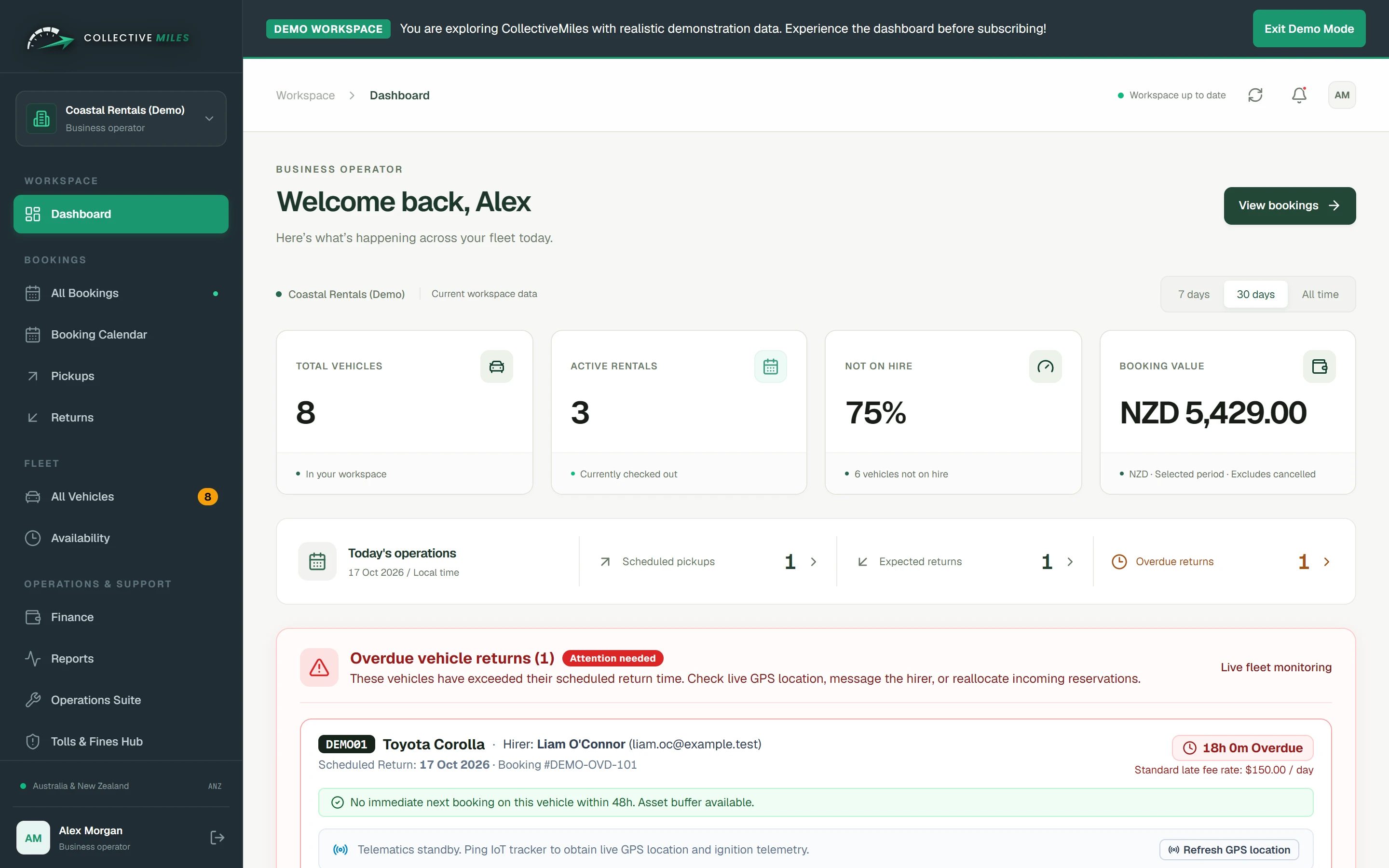
Daily overview
Plan the day
See the day’s pickups, expected returns, active rentals, and overdue vehicles before the counter gets busy.
- Check how many vehicles are active or available
- Open today’s pickup and return lists
- Spot overdue returns that could affect the next booking
- Move from the summary to the relevant rental record
Explore the sample workspace
Try the sample workspace with dummy data before subscribing.
BUILT FOR RENTAL OPERATORS
From busy to in control.
Everything needed to accept bookings, coordinate vehicles, resolve incidents, and safeguard your operational data.
Operations
Booking Review Queue & Conflict Check
Review incoming customer booking requests, view active rental overlaps, and inspect conflict blockers before confirming or rejecting.
Fleet Care
Up to 25 Vehicle Photos
Keep up to 25 images with each vehicle, choose the primary image, and reorder the gallery used by the operator workspace and configured public listings.
Insurance & Claims
Alternate Vehicle Assignments
Select an eligible replacement vehicle when the original cannot fulfil a booking, then record the mandatory reason with the assignment.
Operations
Split Bookings & Vehicle Handovers
Split a customer's rental period across multiple vehicles. Generate dedicated handover checklists, fuel records, and odometer inspections for every vehicle swap.
Customer Communication
Configured Customer Updates
Connect supported booking decisions to configured customer notification workflows. The sample demo never sends a real message.
Customer Experience
Custom Website Building
Launch a professionally branded, mobile-first rental website with your colours, content, vehicle offering, and booking calls-to-action.
Issue Resolution
Operator Incident & Support Tickets
Built-in ticketing system for mechanical alerts, accident damage logs, and customer requests with priority tracking and threaded operator comments.
Disaster Recovery
Local Access During Connection Problems
Look up vehicle and booking information already stored on the device while a temporary connection problem is resolved.
Data Ownership
Downloadable Data Copies
Export fleet and booking records as CSV or download the available system data as JSON, then store those files under your own access controls.
HOW A RENTAL MOVES
One route from request to return.
CollectiveMiles keeps each decision attached to the rental record, so availability, handover information, and operational issues do not disappear into separate messages or spreadsheets.
See the complete feature workflow →- 01Request
A customer asks for a vehicle
A booking request records the customer, vehicle, dates, and pickup and return details. It enters the operator queue for a decision—it is not confirmed automatically.
- 02Review
The operator checks the allocation
The team reviews vehicle status and overlaps with confirmed or active bookings. If the original vehicle cannot be used, an eligible replacement can be selected with a recorded reason.
- 03Handover
The rental leaves with a clear record
Vehicle-specific handover records keep the location, odometer, fuel, inspection status, notes, and related condition information with the booking.
- 04Return
Issues become visible next actions
Return condition, damage, maintenance, or customer issues can be recorded and followed through tickets, so the next rental starts with better context.
CLEAR, PREDICTABLE PRICING
Right-sized for your fleet.
Set your vehicle count, compare every package, and open your operator workspace with the right plan already selected.
Australian prices are displayed in AUD and include 10% GST. New Zealand prices are displayed in NZD and include 15% GST. Change region from the navigation bar.
Request a 14-day trial · Includes 10% AU GST · Messaging usage, advanced integrations, migration, and custom implementation are priced separately when required.
10 Vehicles
1–56–1011–2526+
Recommended fitGrowth plan
Starter
1–5 vehicles
Save 20%A$348
A$278.40AUD / year
You save A$69.60 · billed annually · includes 10% AU GST
Ideal for boutique rental operators and emerging single-depot fleets.
- Up to 5 vehicles managed
- Booking request review queue (Accept / Reject)
- 2 to 7 vehicle photo manager
- Alternate car swap for insurance claims
- Configured booking notification workflows
- Local record access and JSON export
Recommended Fit
Growth
6–10 vehicles
Save 20%A$468
A$374.40AUD / year
You save A$93.60 · billed annually · includes 10% AU GST
The sweet spot for growing regional rental operators needing split rentals.
- Up to 10 vehicles managed
- Split booking allocations & multi-car handovers
- Incident ticket generation & internal notes
- Compliance alerts (WOF/COF/Rego/RUC)
- Operator audit trail for insurance swaps
- Email support
Scale
11–25 vehicles
Save 20%A$828
A$662.40AUD / year
You save A$165.60 · billed annually · includes 10% AU GST
For expanding multi-location operations with high turnover and fleet sharing.
- Up to 25 vehicles managed
- Advanced conflict inspection & blocker alerts
- Multi-user operator & staff roles
- Local record access and operator-controlled exports
- Branding and communication configuration review
- Migration and integration scope review
Fleet Pro
26+ vehicles
Contact sales
Custom pricing for larger fleets
A tailored option for fleets with 26 or more vehicles.
- Vehicle and location requirements reviewed
- Separate operator workspace and user access review
- Booking integration requirements reviewed
- Migration and implementation scope documented
- Roles and operational workflow review
- Support commitments defined in the order
ONE CONTINUOUS OPERATION
Every rental makes the next one clearer.
CollectiveMiles connects the decisions around a rental—not just the booking. Each handover leaves the fleet more prepared for what comes next.
One connected record, from request to return.

COMMON QUESTIONS
Questions about running your rentals with CollectiveMiles?
Learn how bookings, vehicle records, and daily rental tasks work together.
Read the detailed product guide →CollectiveMiles is designed for vehicle rental and fleet operators in Australia and New Zealand. Plans cover different fleet sizes, while location setup, staff access, and data migration are agreed during onboarding.
A customer’s request appears in the booking queue for your team to review. You can check the dates, assigned vehicle, and any conflicts before accepting or rejecting it. The rental is only confirmed after an operator approves the request.
CollectiveMiles flags overlapping confirmed or active rentals while an operator reviews a request. Your team can resolve the conflict before confirmation, including choosing another suitable vehicle and recording why it was changed.
Yes. Your branded website can show your fleet and send customer requests into the booking queue. Your business supplies the branding, vehicle information, contact details, and rental policies used on the site.
The handover record keeps details such as location, odometer, fuel level, condition notes, and inspection status with the vehicle. If damage or another issue occurs, your team can open a ticket, set its priority, add notes, and track it through to closure.
An operator can assign another available vehicle and record the reason for the change. The replacement stays connected to the original booking, giving the next staff member a clear history of what changed.
Yes. The pricing calculator switches between AUD with 10% Australian GST and NZD with 15% New Zealand GST. If your business uses different tax treatment, confirm the required invoice setup before subscribing.
You can explore sample bookings, vehicle records, issue tickets, and import and export controls in the interactive workspace. The records are fictional, and the demo does not contact customers, take payments, or change a live rental business.
The data tools shown in the product include CSV exports for fleet and booking records and a JSON system download. Store any downloaded file securely because it is no longer protected by your workspace access controls once it is on your device.
YOUR NEXT CHAPTER STARTS HERELess admin.
Less admin.
More road ahead.
See the workspace for yourself before you choose a plan. Try the live interactive demo or talk to our team for a personalized walkthrough.
No credit card required for the interactive sample dashboard.